


I’m really excited to share that Activity Log Pro v1.0.9 is out. This one has been on my list for a while — it’s the Live Sessions screen, and I think it’s one of the most genuinely useful things I’ve added to the plugin yet.
The idea is simple: instead of only seeing what happened after the fact, you can now see who is logged in right now, how active they are, and — if you’re on Premium — take action immediately.
(ChangeLog | User Guide)
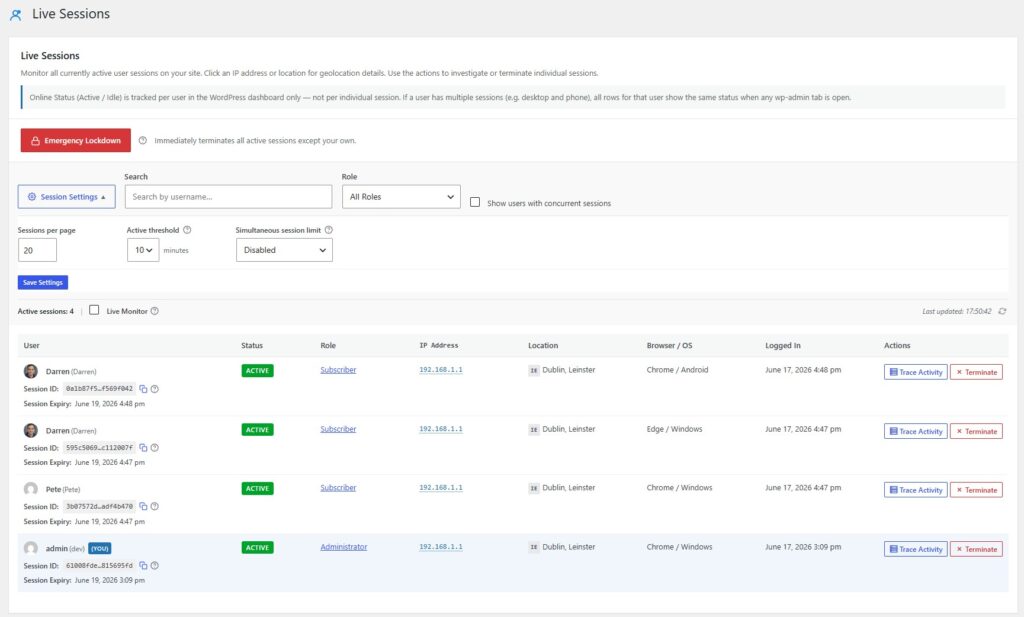
Live Sessions (Free)
The new Live Sessions screen gives you a real-time snapshot of everyone currently logged into your WordPress site. For each active session you can see:
- User & Role — who’s logged in and what permissions they have
- IP Address — where the session is coming from (anonymised by default)
- Browser & OS — what device and browser they’re on
- Login time & session expiry — when they signed in and when the session will expire
- Session ID — for tracking and reference
You can search and filter by username or role, so on a busy site with a big team it’s easy to find exactly who you’re looking for.
Active vs. Idle — each session is marked as either Active (the user is navigating the dashboard right now) or Idle (they logged in but haven’t done anything recently). You can set the idle threshold to 5, 10, or 15 minutes, depending on how your site is used.
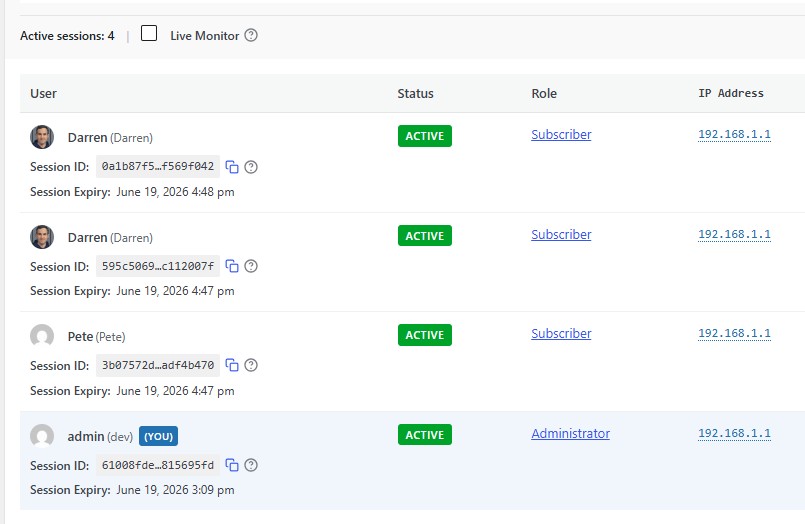
Live Sessions — Premium Controls
Premium users get all of the above, plus a set of session management controls that I think you’ll find genuinely useful for security.
Terminate individual sessions — if you spot a session that shouldn’t be there (a former team member, a suspicious login, anything that looks off) you can end it immediately, right from the screen. No need to dig around in user settings.
Emergency Lockdown — this one is for worst-case scenarios. One click logs out every active session on your site, except yours. If you suspect something is wrong and need to clear the decks fast, this is the button for that.
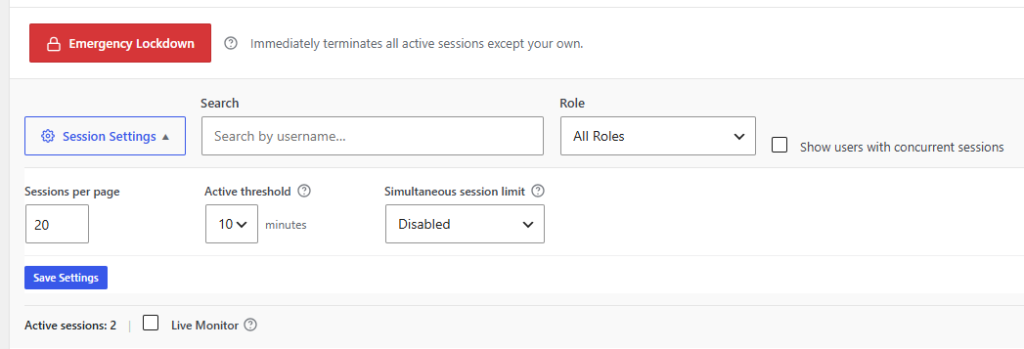
Simultaneous session limits — you can cap how many active sessions a single user account is allowed to have at once. If someone is sharing their login (whether intentionally or not) this catches it and blocks the extra session.
Full IP display & Geolocation — Premium shows the full, un-anonymised IP address and maps it to a geographic location, so you can see at a glance if a login is coming from somewhere unexpected.
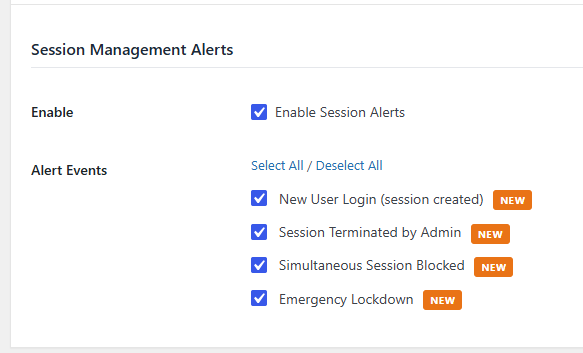
Session management alerts — get email notifications for key session events: a new login, a terminated session, a blocked session (simultaneous limit hit), or an emergency lockdown being triggered. So even when you’re not watching the screen, you’ll know.
Bug Fix
There was a download session timeout issue in the Premium plugin updater that could occasionally cause plugin updates to fail with a “Download failed. Forbidden” error. That’s been resolved in this release.
Update Now
Activity Log Pro v1.0.9 will appear as an update in your WordPress dashboard shortly. As always, keep a backup before updating any plugin — but this one is safe and straightforward to apply.
If you haven’t explored Premium yet, the Live Sessions controls are a good reason to take a look at what’s included: activitylog.pro/pricing →
Thanks for using Activity Log Pro. As always, if you spot anything or have a feature request, I’d love to hear from you.
Enjoy the update! If you find it useful, a 5-star review on WordPress.org goes a long way — it really does help others find the plugin.
And again, a big thank you for using my plugin.
— Darren