


We’ve just released Activity Log Pro 1.0.6. The highlight is Log Channels (Premium) – a powerful new way to stream your activity logs to external platforms like Grafana Loki, Better Stack, Slack, and more in real time. Alongside this, I’ve introduced Login Flood Guard to reduce noise during brute-force attacks, added cleaner Daily Groups for improved log readability, and shipped a reliability fix for JSON feeds when used with community plugins like BuddyPress. This release is all about giving you more control, better visibility, and a smoother logging experience.
Your WordPress activity log is one of the most practical sources of truth on a site. It answers everyday questions — who changed that setting, who installed a plugin, who logged in from where — and it becomes invaluable when something looks wrong.
But a log that only lives inside WordPress has a ceiling. Hosting retention and disk space cap how far back you can see. Restores and migrations can complicate continuity. And in the worst cases, a log is only trustworthy if it cannot be the only copy.
That is the simple case for an off-site mirror: a continuous, automatic copy of audit events in a system you control — the same platforms many teams already use for monitoring, alerting, and long-term retention.
“Export sometimes” is not the same as mirroring
Exports are useful for snapshots. They are not a substitute for always-on forwarding, because incidents do not wait for your next manual export. Gaps in the trail make investigations slower, and slow investigations are expensive.
What you want in practice is: every activity log entry is forwarded as it is recorded, without slowing down admins or visitors, and without you babysitting the process.
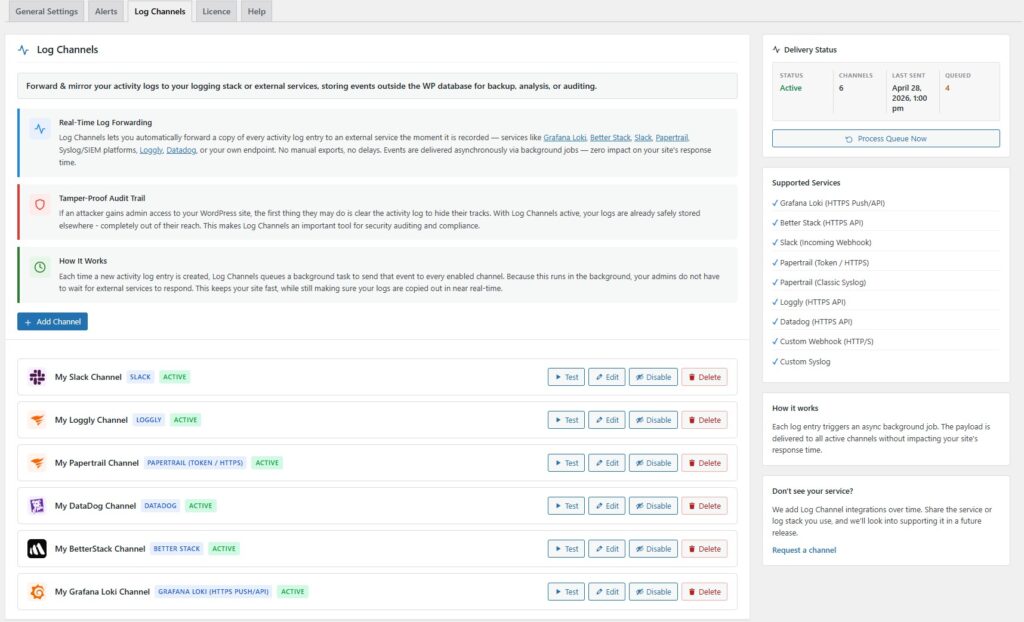
That is what Log Channels is for – a premium capability in Activity Log Pro that routes activity log events to external destinations automatically – now available in Activity Log Pro (premium) as of version v1.0.6. (ChangeLog | Docs)
What Log Channels does
Log Channels lets you forward and mirror activity log entries to external services the moment they are recorded. Supported destinations include Better Stack, Slack, Papertrail, Loggly, Datadog, Syslog/SIEM targets, and your own custom webhook endpoint — so you can bring the logging stack you already trust, instead of adopting yet another dashboard you did not ask for.
Each event can be understood in context across many installs: entries are tagged with the site name and site URL, which makes filtering and searching across a portfolio of client sites far more manageable than hopping between wp-admin screens.
Fast sites, reliable delivery
Forwarding should never make WordPress feel sluggish. Log Channels delivers events asynchronously via background jobs, so your site is not blocking on third-party APIs during normal browsing and admin work. You get near real-time mirroring with minimal impact on response time — the right trade-off for production sites.
Why agencies and maintenance teams reach for it first
If you manage multiple WordPress sites, centralised visibility is not a luxury. It is how you spot patterns, respond quickly, and support clients without repeatedly logging into every dashboard.
Log Channels fits that workflow by streaming logs into the platform your team already uses — whether that is a structured logging provider, a SIEM path via Syslog, or a webhook into your internal tooling.
A security angle (stated plainly, not dramatically)
If someone with sufficient access attempts to cover their tracks, local logs alone may not be enough to reconstruct what happened. A mirrored copy that is already outside WordPress is a stronger foundation for auditing and incident review — because it is not the same surface area as the site being investigated.
Log Channels is not a replacement for hardening, backups, and least-privilege access — it is a sensible layer on top: continuous replication of audit events to a destination you control.
Is this “compliance in a box”?
Log Channels can support better audit practices (retention elsewhere, centralised review, alerting in tools you already operate). Compliance requirements vary widely by industry, region, and contract — so treat this as operational hygiene, not a legal guarantee. The honest pitch is stronger anyway: it makes your audit trail more durable and more usable.
Getting started
If you want the full capability breakdown, examples, and UI details, see Log Channels on the Activity Log Pro features page:
activitylog.pro/features → Log Channels
Docs: Log Channels.
Quick FAQs
Real-time delivery to external services is a premium feature.
Events are queued and sent in the background, designed to avoid blocking page loads while still mirroring entries quickly.
Yes — alongside providers like Datadog and Better Stack, you can use a custom webhook (and Syslog/SIEM-style targets where applicable).